
Last Saturday night, I was settling in to watch the Manchester United match. Beer in hand, snacks ready, everything perfect. Then my IPTV player froze. Again. Right as the striker was about to score.
I’d had enough.
Three years I’d been using whatever garbage player came with my IPTV subscription. Three years of buffering, crashes, and hunting through 600+ channels like some kind of digital archaeologist. Why? Because I figured all IPTV players were basically the same level of terrible.
Turns out, I was completely wrong.
Looking for a reliable best IPTV player app? SmartStream is available on both Google Play Store for Android users and Apple App Store for iOS devices. Whether you’re on Android or iPhone, you can download it right now and start watching your IPTV content without the usual headaches.
My cousin showed up for a family dinner talking about this new player he’d installed. Kept going on about how fast it was, how everything actually worked. I figured he was exaggerating—he’s the type who gets excited about tech stuff easily.
“Just try it,” he said. “It’s called SmartStream Player. Download it right now.”
I rolled my eyes but grabbed my phone anyway. Figured I’d prove him wrong and we could move on with dinner. Downloaded it. Added my IPTV playlist URL. The same messy playlist that looked like alphabet soup in my old player.
Then something weird happened.
SmartStream actually… organized everything? Movies appeared in a movies section. Series had their own area. Live channels weren’t just dumped in one endless list. Everything had proper names, categories that made sense. I could actually find stuff without scrolling for five minutes.
“Okay, this is different,” I admitted. My cousin just grinned like he’d won some kind of bet.
Here’s the thing about most IPTV players—they feel like someone built them in 2008 and never updated them. Clunky interfaces. Random crashes. Features that don’t actually work. You’re stuck with whatever your IPTV provider gives you because switching seems like too much hassle.
SmartStream changed my mind about that whole situation.
Remember when I mentioned my 600+ channel playlist looking like alphabet soup? My old player just listed everything alphabetically. “24/7 Classic Movies” sat next to “ABC Sports HD” next to “Afghanistan National TV.” Zero logic. Finding anything meant scrolling, reading, scrolling more, maybe using that terrible search that barely worked.
SmartStream took that same playlist and sorted it automatically. Movies went into a movies section with proper categories—action, comedy, drama, the works. TV shows got organized by genre. Live TV channels were grouped by type—sports channels together, news channels together, entertainment channels together.
Get the best IPTV experience on your device


Suddenly I could browse like I was using Netflix, not some janky app from a decade ago. My wife, who’d always complained about how confusing IPTV was, started using it without asking me where channels were. That’s when I knew this was actually different.
My old player had “search.” Technically. You’d type something in, wait forever, then get results that maybe included what you wanted. Sometimes it worked. Usually it didn’t.
SmartStream’s search is stupid fast. Type “football” and boom—every football-related channel, every football movie, every football documentary appears instantly. Type three letters of a show name and it finds it before you finish typing.
I tested this one night. Searched for some Turkish drama my wife watches. Name has like 15 letters I can barely pronounce. Typed the first four letters. Found it immediately. Clicked it. Started playing. The whole thing took maybe eight seconds total.
Compare that to the old way—scrolling through hundreds of channels, trying to remember if it started with “K” or “G,” getting frustrated, giving up, just picking something else to watch.
This is huge for me. I watch a lot of live sports. Premier League, cricket, tennis, whatever’s on. Live sports cannot buffer. Miss five seconds during a football match and you might miss the only goal. Miss thirty seconds during cricket and you’ve missed an entire over.
My old player buffered constantly during live content. Didn’t matter if my internet was fine—the player just couldn’t handle it. I’d watch the buffer wheel spin while knowing I was missing actual play.
SmartStream handles live content differently. It’s optimized specifically for IPTV streaming, which means it knows how to buffer properly, handle network issues, keep video playing even when your internet hiccups slightly.
I’ve watched dozens of matches since switching. Buffering has happened maybe twice, both times when my internet actually went down for everyone in the house. Every other time? Smooth playback from start to finish. No freezing during crucial moments. No missing goals because the app decided to take a break.
That alone makes it the best IPTV player app I’ve used. Everything else is just bonus features.
My household speaks three languages. We watch content from four different countries. Subtitle and audio support matters a lot to us.
Most IPTV players technically support multiple audio tracks and subtitles. But using them? Total nightmare. Hidden in weird menus. Don’t sync properly. Wrong font sizes. Sometimes they just don’t work and you’re stuck guessing why.
SmartStream makes this simple. Playing something with multiple audio options? Tap the audio button. Pick the language you want. Done. Subtitles work the same way. Tap, select, they appear properly synced and actually readable.
We watch a lot of international content—Turkish dramas, Indian movies, Spanish news. Being able to switch audio and subtitle tracks without fighting the player is huge. My mom, who’s not tech-savvy at all, figured it out in about thirty seconds. That’s how you know the interface actually works.
Let’s be honest. You probably watch the same 20-30 channels regularly. Maybe you’ve got your local news channel, couple sports channels, some movie channels, that one cooking show, whatever.
With my old player, I’d scroll through hundreds of channels to find those same 20 channels every single time. There was a favorites feature supposedly, but it barely worked and was hidden so deep I never used it.
SmartStream’s favorites actually make sense. See a channel you watch often? Tap the star. It goes to favorites. Want to watch something from your favorites? Open the favorites section. All your regular channels right there in one list.
I’ve got about 25 channels marked as favorites now. News channels I check every morning, sports channels for matches, couple entertainment channels my family watches, some movie channels I browse when bored. Instead of hunting through 600+ channels, I just open favorites and pick what I want.
My wife has her own set of favorites—her drama channels, cooking shows, couple news channels. We don’t have to share one messy list or memorize channel numbers like it’s 1995.
I’ve got two kids. One’s seven, other’s ten. Our IPTV playlist has everything—cartoons, sure, but also horror movies, adult content, news channels showing graphic coverage.
My old player had parental controls that were basically useless. You could “hide” channels, except they weren’t actually hidden, just grayed out. Kids could still see them and would ask what they were. Completely defeated the purpose.
SmartStream lets you actually lock content behind a PIN. Set up parental controls, pick what gets locked, set a PIN code. Now when my kids use the TV, they can watch their cartoons and kid-friendly content. Everything else? Locked. They can’t even see it exists.
They don’t ask about weird channels anymore. They don’t accidentally click on something inappropriate. I don’t have to supervise every second they’re watching TV. The controls actually work like you’d expect them to.
I’ve got two IPTV player app subscriptions. One provider has better sports coverage. Other one has better international content and movies. Made sense to keep both, except managing two playlists in one player was a disaster with my old app.
Everything would mix together into one giant mess. I couldn’t remember which channels came from which provider. If one playlist updated, it’d mess up the other one somehow. Total chaos.
SmartStream IPTV player app is best and handles multiple playlists separately. Add your first playlist—it organizes everything. Add your second playlist—it keeps it separate. Want to switch between them? Tap the playlist selector. Pick which one you want. That’s it.
My sports playlist stays separate from my international content playlist. No mixing. No confusion. When I want to watch football, I switch to the sports playlist. When my wife wants to watch her dramas, she switches to the international playlist. Clean. Simple. Works exactly how you’d expect.
SmartStream IPTV player app comes in two flavors. Free version and premium version. Here’s the real deal on both.
Free Version: Everything Works, But Ads Show Up
Download the app, costs nothing. Add your IPTV playlist. All the features I just talked about? Organization, search, smooth playback, subtitles, favorites, parental controls, multiple playlists? All included in the free version.
The catch is ads. Not during video playback thankfully—that would be awful. But you’ll see ads occasionally while browsing content, opening sections, stuff like that.
For a lot of people, the free version is perfectly fine. You get a fully working best IPTV player app without paying anything. Ads are a small price for not dealing with terrible organization and constant buffering anymore.
Premium Version: Pay Once, Ads Gone Forever
Here’s where SmartStream does something different from most apps.
Usually, removing ads means paying monthly. $5 per month. $10 per month. Another subscription on top of your IPTV subscription, Netflix subscription, Amazon subscription, and whatever else you’re paying for.
SmartStream charges 99 cents. Once. That’s it.
Pay 99 cents one time—less than a cup of coffee, less than a candy bar—and ads disappear forever. No monthly billing. No annual renewals. No subscription that you forget about and keeps charging you. Just one 99 cent payment and you’re done.
I upgraded to premium about two days after installing the free version. Not because the ads were terrible, but because 99 cents for lifetime ad-free seemed almost too cheap to pass up. Best dollar I’ve spent on an app probably ever.
People Who Cut the Cord But Miss Cable’s Simplicity
You ditched cable because it was expensive and locked you into terrible contracts. Switched to IPTV to save money and get more content. Smart move.
But now you’re stuck with a player that makes you nostalgic for cable’s simplicity. Cable might’ve been overpriced, but at least pressing buttons on the remote made sense. Your IPTV player feels like navigating a maze blindfolded.
SmartStream brings back that simplicity. Organized content you can actually browse. Working search. Smooth playback. Everything in logical sections. You get all the benefits of IPTV—more channels, better prices, international content—without the janky player experience that makes you regret cutting the cord.
Sports Fans Who Cannot Tolerate Buffering
You know the pain. Big match. Tied score. Final minutes. Everything riding on this play.
Buffer wheel appears.
You miss the game-winning goal because your player couldn’t handle the stream.
If this has happened even once, you need a better player. SmartStream’s built specifically to handle live sports with minimal buffering. Will it never buffer? Of course it’ll buffer if your internet actually dies. But for normal internet conditions, even live sports play smoothly without constant interruptions.
I’ve watched Champions League matches, cricket tournaments, tennis finals—all without the buffer wheel ruining crucial moments. That’s worth switching players for right there.
International Content Enthusiasts
Maybe you’re watching Turkish dramas. Indian cricket. Arabic news. Korean variety shows. Spanish telenovelas. Japanese anime. IPTV is incredible for international content—you get channels from literally everywhere for way less than traditional cable.
But handling multiple languages is a nightmare with most players. Wrong subtitle fonts. Audio tracks don’t switch properly. Everything’s harder than it should be.
SmartStream’s multi-language support actually works. Switch audio tracks easily. Add subtitles in whatever language you need. Stop fighting your player just to watch content in your preferred language.
People Who Value Their Time More Than Fighting With Technology
This is everyone really, but some feel it more than others.
If you’re spending 10 minutes every time you want to watch TV just trying to find a channel, fighting with your player to load something, or dealing with crashes that require restarts—that’s hours of your life wasted every month.
SmartStream respects your time. Open app. Search finds your content in seconds, or browse organized categories. Click. Watch. Done. The player disappears into the background and just works like it’s supposed to.
You don’t need tech skills for this. Here’s what I did when my cousin made me download it at dinner.
Grabbed my phone. Opened the Play Store. Searched “SmartStream Player.” Tapped install. Waited about 20 seconds for it to download.
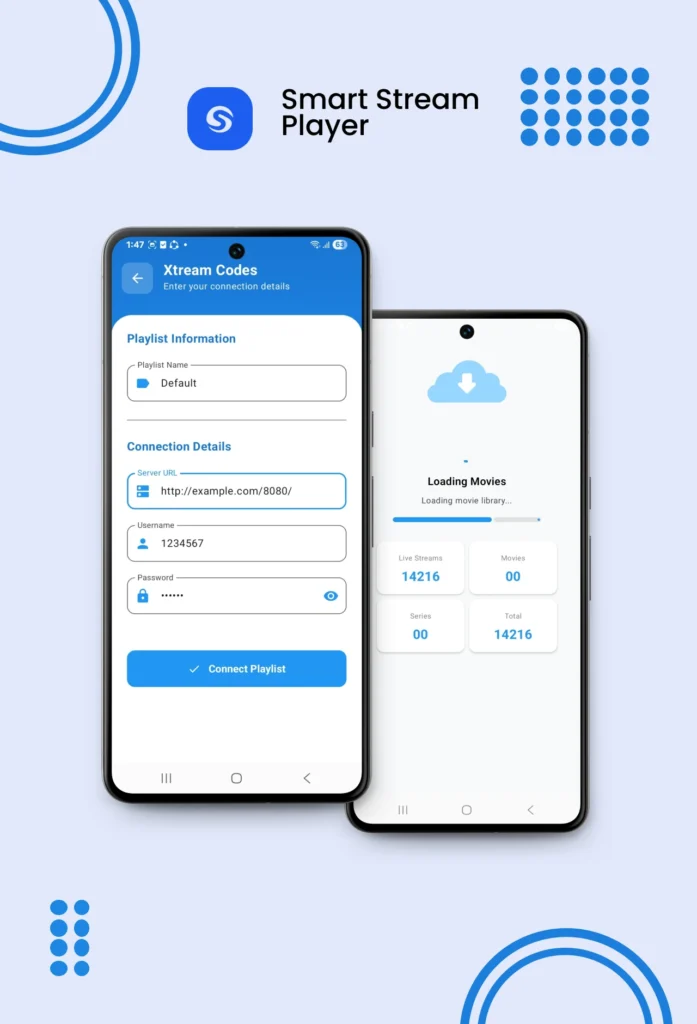
Opened the app. It asked if I wanted to add a playlist. Tapped yes. Went to my IPTV provider’s website on my phone. Copied my playlist URL—the M3U link they give you. Pasted it into SmartStream.
The app started importing my playlist. Progress bar appeared. Took maybe a minute for my 600+ channels to import. Could see it organizing everything as it worked.
Import finished. Suddenly my channels were sorted into categories. Movies section, series section, live TV section. Everything labeled properly. I tapped a random movie channel to test it.
Started playing immediately. HD quality. No buffering. I was watching content through a player that didn’t suck within maybe three minutes of starting the download.
For premium, I tapped the upgrade button later that week. Paid 99 cents. Ads disappeared instantly. Total setup time including premium upgrade? Maybe five minutes spread across two days.
That’s it. No complicated configuration. No tech support needed. No reading manuals. Just add your playlist and watch.
I need to be clear about something important because some people get confused.
SmartStream Player is not a content provider. It’s not giving you TV channels. It’s not a streaming service like Netflix or Hulu. It doesn’t come with movies or shows included.
It’s a player. Think of it like VLC media player or Windows Media Player. Those play videos, but you provide the videos yourself. Same concept here.
You need an IPTV subscription from an actual provider. They give you the playlist with all your channels and content. SmartStream plays that playlist through a much better interface than whatever default player your provider gave you.
Some people download SmartStream expecting free TV. That’s not how this works. You still pay your IPTV provider for content. SmartStream just makes watching that content way less frustrating.
If you don’t have an IPTV subscription yet, get one first. Then get SmartStream to watch it properly.
“It’s just a player,” you might say. “How much difference can it really make?”
Let me put it this way. How much time do you spend watching TV and movies each week? Couple hours? Five hours? Ten hours?
Now imagine spending even just five extra minutes every time you sit down to watch something. Fighting with a bad player. Buffering. Searching through disorganized content. Dealing with crashes. Restarting the app.
That adds up fast. Five minutes per day is over 30 hours per year wasted just fighting with your player. That’s like losing an entire weekend annually to technology that should just work.
A good player eliminates that waste. You open it, find what you want immediately, it plays smoothly, you enjoy your content. The player stops being something you think about and just becomes invisible infrastructure that works.
That’s what SmartStream did for me. I went from spending time fighting my player to just watching content. Sounds simple because it is simple. That’s how technology should work.
You’re already paying for IPTV. Whether it’s $15 monthly, $50 monthly, whatever. You chose IPTV because it offers more channels, better international content, or costs less than cable.
But if your player is garbage, you’re not getting your money’s worth out of that subscription. You’re fighting technology instead of enjoying the content you’re paying for.
SmartStream fixes that problem completely. It’s the best IPTV player app that actually makes IPTV feel polished and professional instead of janky and frustrating.
Clean interface that makes sense. Smart organization that saves time. Smooth playback that doesn’t buffer constantly. Powerful search that actually finds things. Subtitle support that works. Parental controls that actually control. Multiple playlists without chaos. All the features you actually need in an IPTV player.
Free to try with everything included. 99 cents one-time if you want ads gone forever. No subscriptions. No hidden fees. No nonsense.
Whether you’re a cord cutter, sports fan, international content watcher, or just someone tired of fighting with terrible IPTV players—SmartStream is worth downloading.
I switched three months ago. Haven’t touched my old player since. Missed zero football goals due to buffering. Found every show my wife asked for without spending 10 minutes scrolling. My kids use TV without my supervision. Everything just works.
That’s worth way more than 99 cents.
You can grabSmartStream Player for both Android and iOS devices right here. Download it, add your playlist, see if it makes as big a difference for you as it did for me.
Your IPTV subscription deserves a player that doesn’t suck. You deserve to actually enjoy the content you’re paying for instead of fighting with crashes and buffering.
Try SmartStream. Worst case, you delete it and you’re back where you started. Best case, you never deal with terrible IPTV players again.
Built by Asapp Studio – We make apps that solve real problems instead of creating new ones.