
I still remember the exact moment I lost it.
I was in the middle of a client call, juggling three apps, when I copied a critical invoice link from WhatsApp. Thirty seconds later—poof. Gone. Overwritten by a random phone number I’d copied from an email. I spent the next 20 minutes frantically searching chat histories like a digital archaeologist.
That was the day I swore I’d never trust Android’s built-in clipboard again.
Fast-forward six months, and I’ve been using ClipMate—our own clipboard manager app—every single day. It’s not just a tool. It’s the reason I don’t throw my phone across the room anymore.
If you’re tired of losing copied text, images, or links the second you switch apps, this post is for you. I’m going to walk you through why ClipMate is the only clipboard app I trust, how it works in real life, and why it’s 100% free (yes, really).
Let’s be real: Google’s clipboard is like a Post-it note in a hurricane.
I’ve lost:
Sound familiar?
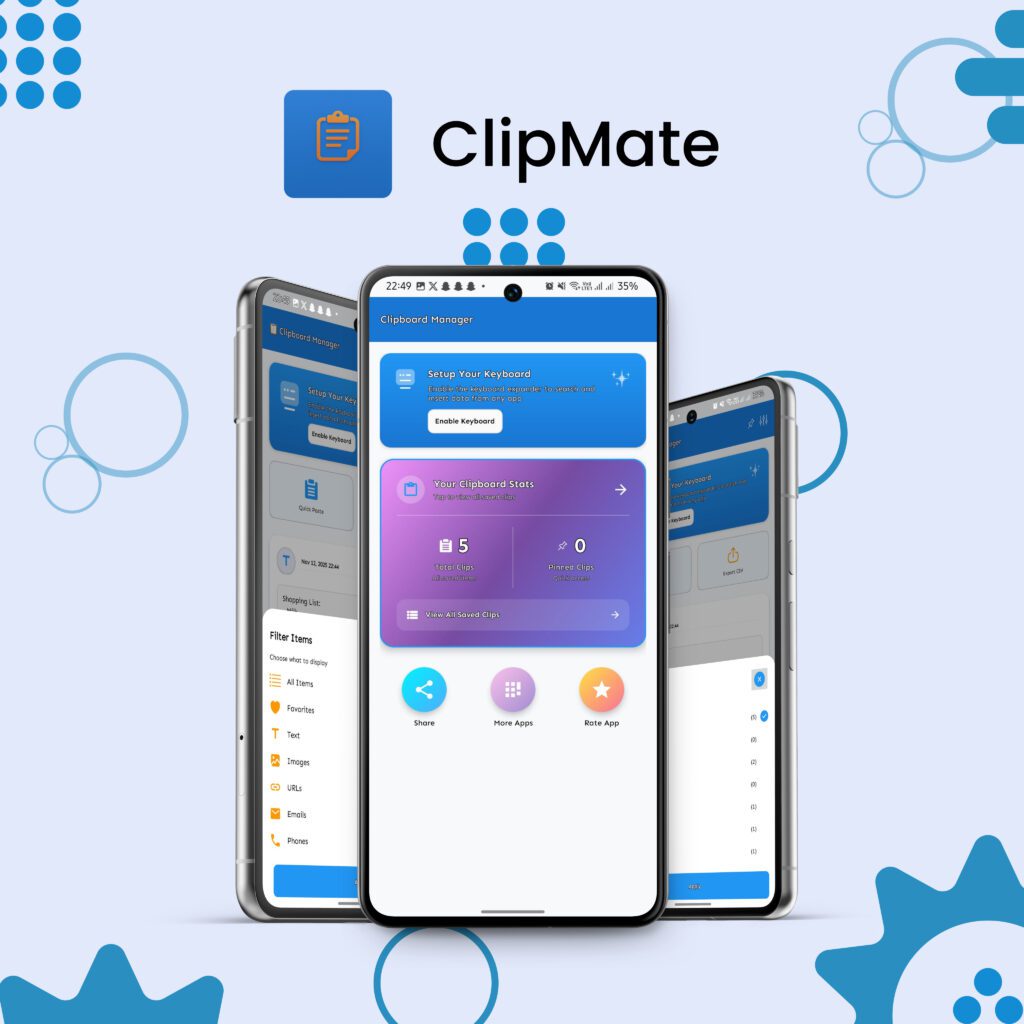
ClipMate isn’t just another app. It’s a full replacement for Android’s broken clipboard system.
Here’s what it does differently:
Every single thing you copy—text, links, images, code—is saved automatically. Scroll back hours, days, or weeks. I recently found a recipe I copied three months ago. No digging. No stress.
I have a pinned list for:
One tap → paste. Done.
This is the feature I use 50 times a day.
Switch to the ClipMate Keyboard, and your entire clip history appears while you’re typing. No app switching. Plus, there’s a built-in emoji bar (because who doesn’t need a 🔥 every now and then?).
Copy a screenshot from Chrome → open ClipMate → crop, draw, or share instantly. No need for a separate photo editor.
I use this for:
Moving to a new phone? Export your entire clip library as a secure CSV file. Restore in seconds. Your data stays on your device—no cloud, no tracking.
| User | How They Use It |
| Freelancers | Save client briefs, invoice templates, feedback notes |
| Students | Copy lecture slides, formulas, research links |
| Parents | Store school schedules, doctor contacts, grocery lists |
| Social Media Managers | Reuse hashtags, captions, link bundles |
| Developers | Copy API keys, error logs, code snippets |
“I used to lose copied text every 5 minutes. ClipMate saved my sanity. The keyboard is a game-changer.”
— Ayesha K., Graphic Designer
That’s it.
Is ClipMate really free?
Yes. All core features—unlimited history, image editing, backup—are 100% free forever. We might add premium themes later, but copying and pasting will always be free.
Does it work offline?
Completely. All data stays on your device.
Is my data safe?
We don’t collect anything. No ads. No tracking. Backups are encrypted CSV files—only you can access them.
If you’ve ever screamed “I swear I copied that!” into the void, do yourself a favor.
Download ClipMate Free on Google Play
Or learn more on our official page: ClipMate – Ultimate Clipboard Manager
I still lose my keys daily. But at least I never lose my copied text anymore.
Have you tried ClipMate?