
Ever found yourself stuck between writing notes and crunching numbers? You’re typing up a budget, jotting down expenses, or planning a project—and suddenly you’re juggling two apps. One for notes, another for calculations. Back and forth, copying numbers, losing your train of thought.
It’s exhausting, right?
Here’s the thing: traditional notepads treat numbers like lifeless text. You write “500 + 300” and it just sits there. Meanwhile, calculator apps make you stop everything, switch screens, and manually transfer results back to your notes.
That’s where a smart notepad calculator changes everything.
Picture this scenario. You’re planning your monthly budget and you write:
Rent = 1200
Groceries = 450
Utilities = 180
Total = Rent + Groceries + Utilities
Boom. The total appears instantly—right inside your notes. No calculator app. No mental math. No copying results around like it’s 1995.
But here’s where it gets better. Change your grocery budget to 500? Every calculation connected to it updates automatically. Your total, your weekly breakdown, your yearly projection—all adjust in real-time without you lifting a finger.
This isn’t just convenient. It’s how note-taking should’ve worked from day one.
Students tackling homework: Physics problems, math assignments, chemistry equations. Write your work naturally, see instant results. No more switching to a calculator mid-problem and losing track of where you were.
Budget-conscious individuals: Managing monthly expenses, tracking savings goals, planning debt payoffs. Everything lives in one readable place. Change a spending category and watch your entire budget recalculate automatically.
Project planners and estimators: Construction costs, event budgets, time calculations. Adjust material prices or labor hours once—your whole estimate updates everywhere. Way simpler than firing up spreadsheet software for quick estimates.
Small business owners: Invoice calculations, profit margins, inventory tracking. Keep everything organized in natural notes format while getting accurate totals instantly.
Anyone doing quick daily math: Splitting restaurant bills, comparing shopping prices, calculating tips, converting measurements while cooking. Type it like you’d say it out loud—get immediate answers.
Let’s talk about what makes a smart notepad calculator genuinely useful versus just another app cluttering your phone.
Percentage calculations that work naturally: Type “15% of 2000” or “500 minus 20%” and get instant answers. No weird button combinations or confusing syntax. Just write it how you think it.
Variables for repeated values: Set “hourly_rate = 25” at the top. Use it throughout your notes. Change it once later and everything referencing it updates everywhere automatically. Perfect for scenarios where certain numbers appear multiple times.
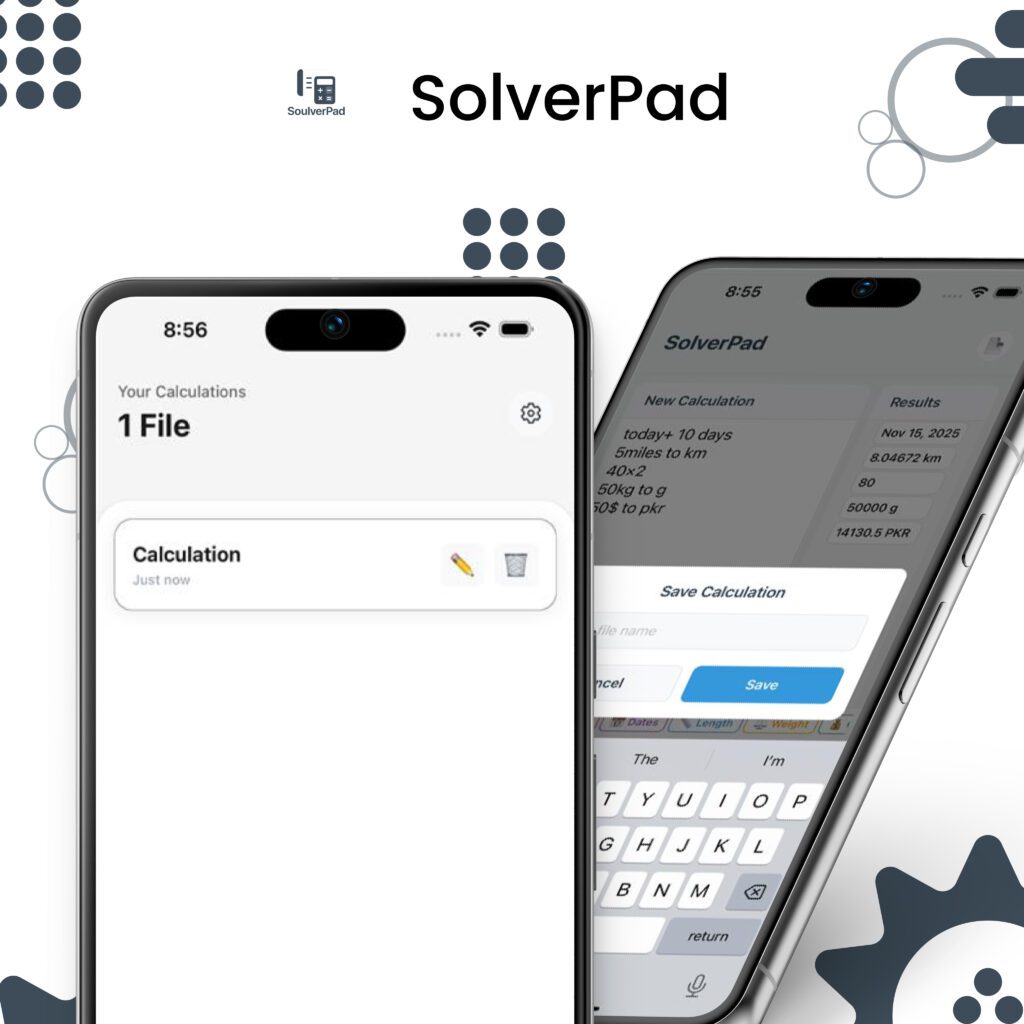
Built-in unit conversions: Write “5 miles to kilometers” or “2.5 hours to minutes” and get answers immediately. No Googling conversions or opening separate apps. Distances, weights, temperatures, time—common conversions people actually use daily.
Clean, distraction-free layout: Your notes look like notes, not complicated spreadsheet cells. Results appear subtly next to relevant lines. Everything stays readable and organized.
Multi-line calculations: Break complex math across multiple lines naturally. Each step shows its result. Final answer at the bottom. Easy to review, easy to verify, easy to understand later.
Standard calculator apps excel at single calculations. But when you’re working through connected numbers—like planning expenses or building project estimates—they become frustrating fast.
You calculate something. Remember the result. Switch apps. Type the next calculation. Remember that result. Keep mental track of what each number represents. It’s mentally exhausting and mistake-prone.
A smart notepad calculator solves this by keeping everything visible and organized. All your numbers, thoughts, and calculations together in one place. Change any input and watch related calculations update automatically. No mental gymnastics required.
Planning monthly finances: List all income sources and expenses naturally. See your total budget, remaining amount, and category breakdowns—all updating live as you adjust numbers. Way clearer than traditional spreadsheets for personal finance.
Shopping comparisons: Compare prices across stores. Calculate per-unit costs. Factor in discounts and coupons. All in readable notes format that actually makes sense when you review it later.
Recipe adjustments: Doubling a recipe? Halving it? Convert measurements on the fly while keeping ingredient lists organized. No separate converter apps needed.
Study notes with formulas: Write physics formulas, plug in different values, see results instantly. Keep your work organized and verifiable. Perfect for checking homework before submission.
Freelance rate calculations: Calculate project estimates with hourly rates, expenses, taxes, and profit margins. Adjust any factor and watch your final quote update immediately.
Download the app. Open it. Start typing notes with numbers. Watch calculations appear.
That’s it. No tutorial walls. No account creation. No settings configuration before you can actually use it. Just write naturally and the app handles math automatically.
Try typing “monthly income 5000 / 4 weeks” and see the weekly amount appear instantly. Or “shopping 45 + 67 + 23” to sum receipts. The app figures out what needs calculating.
Most apps force you to work their specific way. Smart notepad calculators adapt to how you naturally write instead.
Want budget planning? Write categories and amounts like making a list. The app totals everything.
Need conversions? Type them conversationally. “72 degrees F to Celsius” works perfectly. So does “6 feet 2 inches to cm.”
Working through formulas? Assign variables descriptive names. Use them naturally in calculations. Change one variable—everything updates.
The real power comes from removing friction between thinking and calculating. Your brain focuses on solving problems, not on which app to use or formatting inputs correctly.
Download and start using core features immediately without paying anything. Try it risk-free and see if it fits your workflow.
No account required. No email requested. No credit card for “free trials.” Just download and calculate.
Premium options exist for users who rely on it daily—removing ads and unlocking additional features. One-time purchase. No subscription traps.
Designed for iPhone with interfaces that feel native and smooth. Optimized for iOS 15.1 and newer. Works beautifully on iPhones and adapts to iPad layouts.
Quick access means open app, start typing, get answers. No loading screens. No complicated setup screens. No forced tutorials blocking basic functionality.
Also available on Android through Google Play Store for users across both platforms.
If you regularly write notes involving numbers—budgets, estimates, conversions, formulas, shopping lists—you already know the switching routine. Notes app for writing. Calculator for math. Back to notes for recording results. Repeat endlessly.
Smart notepad calculators eliminate this workflow by combining both tools naturally. Your notes become intelligent enough to handle calculations without breaking concentration.
Students finish assignments faster when they’re not constantly switching apps. Budget planners see complete financial pictures in readable notes instead of scattered data. Project estimators adjust numbers and watch totals update instead of recalculating everything manually.
Whether managing personal finances, studying for exams, planning projects, or thinking through number-heavy ideas—smart notepad calculators make everything smoother by letting you think and calculate in one place.
Traditional notepads are fine for text-only notes. Standard calculators work great for isolated calculations. But when you need both working together seamlessly? That’s where smart notepad calculators shine.
They’re not just about saving time—though they absolutely do that. They’re about maintaining focus, reducing mental load, and making complex calculations actually readable and revisable later.
For anyone who regularly mixes writing with math—students, planners, business owners, budget trackers, estimators—this tool category genuinely improves daily workflows.
Download a smart notepad calculator today and experience what happens when your notepad finally understands numbers as well as words.
Q1: What is a smart notepad calculator app?
A smart notepad calculator combines note-taking with automatic math solving. Write notes naturally and calculations happen instantly without switching apps.
Q2: Who should use smart notepad calculators?
Students, budget planners, project estimators, small business owners, and anyone who regularly mixes writing notes with calculations benefit most from this tool.
Q3: Does it work offline without internet?
Yes, smart notepad calculators work completely offline. No internet connection needed for calculations, conversions, or note-taking features.
Q4: How is this different from regular calculator apps?
Unlike regular calculators, it keeps all calculations visible in organized notes. Change any number and related calculations update automatically everywhere.
Q5: Is it available for both iPhone and Android?
Yes, smart notepad calculator apps like SolverPad are available on both iOS App Store and Google Play Store for Android devices.