
Maria runs a regional insurance company out of Columbus, Ohio. Forty-two agents. Phones go from 8 a.m. straight through to 6 p.m. every single day. She told me something that stuck. “We were spending seventy percent of our agents’ time on calls that never needed a human at all.” Address changes. Policy lookups. Payment confirmations. The same six questions, over and over, for years.
She wasn’t complaining about her team. They were good. She was complaining about the waste. Time that could’ve gone toward a customer who genuinely needed help — someone dealing with a claim, confused about coverage, or upset about a billing error. Instead, every hour was packed with requests a machine could’ve handled in eleven seconds.
That’s where call center automation came in. And it didn’t just solve her problem. It changed how her whole operation worked.
At its simplest, call center automation is the use of technology — software, AI, voice systems, and workflows — to handle tasks that would otherwise require a human agent. That could mean answering a basic question through an automated call center system. It could mean routing a caller to the right department without a live transfer. It could mean pulling up a customer’s account and surfacing relevant notes before the agent even says hello.
It’s not about replacing people. At least not entirely. It’s about making sure people focus on the things that actually need them.
The range is wide. Some businesses start small — a better IVR automation setup, maybe a call center chatbot automation tool on their website. Others go deeper, building full call center automation platforms that tie together CRM integration, AI voice agents, automated quality assurance, and real-time agent assistance. Depends on the size. Depends on the call volume. Depends on what’s actually burning people out.
In 2026, the conversation across the U.S. — in Dallas, in Miami, in Seattle, in Atlanta — is no longer “should we automate?” It’s “how far do we go, and where do we start?”
Picture a customer calling a telecom company in Phoenix, Arizona. They want to know why their bill jumped this month.
Without automation, that call goes into a queue. An agent picks it up, spends two minutes finding the account, listens to the issue, checks the system, explains the change, logs the interaction, and moves on. Seven to ten minutes per call. Multiply that across a thousand calls a day.
With automation layered in, it looks different.
The caller says their name. Speech recognition picks it up. Natural language processing identifies the intent — billing question, not a cancellation request, not a technical issue. The automated call routing system sends them to the billing flow, not the general queue. An AI voice agent greets them, pulls up the account, and explains the bill change. Most callers hang up satisfied. No agent involved.
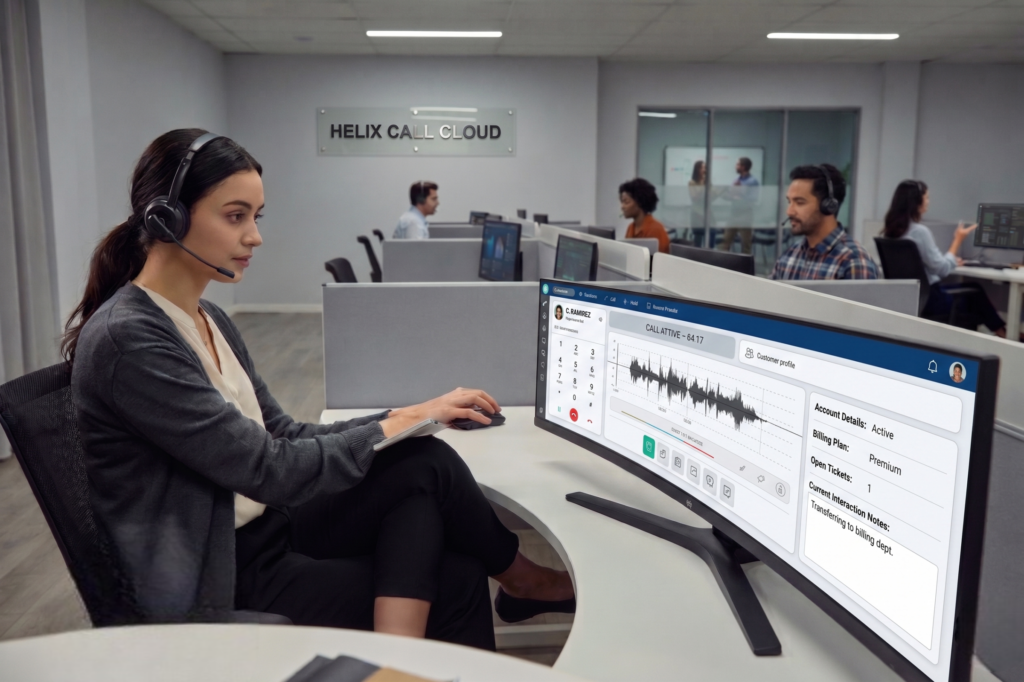
For the ones who need a human? The contact center AI has already done the legwork. The agent sees the account summary, the caller’s history, and what the bot already told them. Real-time agent assistance surfaces a suggested response. The agent doesn’t start from zero. They start from the three-yard line.
That’s how call center automation works in practice. Not a single magic button. A set of connected tools that each remove friction from a different part of the call.
People talk a lot about cost savings. Fair. Call center cost reduction is real — automate enough volume and the math gets interesting fast. But talking only about cost misses most of the story.
First call resolution goes up. When a customer’s issue is matched to the right resource immediately — the right agent, the right knowledge base, the right self-service flow — they don’t have to call back. That matters to the customer. It matters to the metrics.
Average handle time drops. Agents spend less time searching for account info, less time typing notes, less time waiting for systems to load. Automated call monitoring catches quality issues without a supervisor listening to every recording. Call summarization tools log the conversation automatically. Agents don’t spend eight minutes after each call doing wrap-up.
Customer experience automation means customers get answers faster. At any hour. Without holding music. A customer in Portland, Oregon at 11 p.m. asking a simple question about their account shouldn’t have to wait until 9 a.m. the next morning. They shouldn’t. And with the right call center automation software, they don’t.
Workforce optimization improves too. Managers can see patterns in voice analytics and call center analytics automation. Where are agents struggling? What question keeps tripping people up? Which product generates the most confusion? The data is there. Sentiment analysis tools catch frustrated callers before they escalate. Customer intent detection helps route calls before anyone has to ask “how can I help you today?”
Honestly? The benefit that surprised Maria in Columbus most wasn’t the cost savings. It was morale. Her agents stopped dreading Monday mornings. They weren’t grinding through the same repetitive calls hour after hour. The work got harder in a good way. More complex. More human. More interesting.
This space moves fast. New platforms, new integrations, new approaches every quarter. But the core tools have settled into recognizable categories.
IVR automation — interactive voice response — has been around forever, but modern versions are unrecognizable from the old “press 1 for billing” menus. Today’s systems use natural language processing to understand what a caller says, not just what they press. They adapt based on the conversation. They integrate with backend systems to give real answers, not just transfer options.
AI voice agents for call centers handle full conversations now. Not just prompts. A good voice bot can verify identity, pull up account data, process a payment, update an address, and close the call. All without a human. Conversational AI for call centers has gotten good enough that callers often don’t notice — and in some cases, prefer it for routine tasks.
Automated call routing sends callers to the right place without manual transfers. Intelligent call routing goes further — it uses caller history, customer intent detection, account data, and even sentiment analysis to route dynamically. High-value customer calling about a billing issue? Goes to a senior agent. Simple address change? Goes to self-service. Every time.
For outbound operations, predictive dialer technology changes the game. Instead of agents manually dialing and waiting through rings and voicemails, the system dials automatically and only connects the agent when a live person answers. Call volume handled per agent hour goes up significantly. Works well for collections teams, appointment reminders, and outbound sales in states like Texas, Florida, and California where call volumes are enormous.
Agent assist automation — also called real-time agent assistance — puts a co-pilot next to every human agent. The system listens to the call in real time, surfaces relevant knowledge base articles, flags compliance issues, and suggests next steps. Agents make better decisions faster. Training time for new hires drops. Quality scores improve across the board.
Traditional QA meant a supervisor manually listening to maybe five percent of calls. That means ninety-five percent of calls got no oversight at all. Automated quality assurance for call centers changes that ratio. Every call gets scored. Sentiment, compliance language, resolution outcome, script adherence — all measured, all logged, all visible in a dashboard. Nothing falls through the cracks.
Call transcription turns every conversation into searchable text. Call summarization condenses that transcript into a concise note — what the customer needed, what the agent did, what the outcome was. No more agents spending post-call wrap time typing summaries. The system does it. Accurate, consistent, instant.
Customers don’t just call anymore. They email. They chat. They message on social media. Omnichannel contact center automation connects all of that into one view. An agent handles a call from a customer they chatted with yesterday. The history is right there. No “let me look that up.” No starting over. Customer journey automation that actually follows the customer.
Hospitals and clinics in states like New York, Illinois, and Pennsylvania handle enormous call volume. Appointment scheduling. Prescription refill requests. Insurance verification. Healthcare call center automation tackles those high-volume, repeatable interactions so clinical staff can focus on care. Compliance is non-negotiable in this space, and the right automated call center software handles HIPAA requirements without breaking a sweat.
The conversation about automation used to feel like an enterprise thing. Big companies, big budgets. That’s shifted. Call center automation software for small business options have multiplied. A twenty-person insurance office in Boise, Idaho can afford and implement legitimate automation tools now. Call center automation tools designed for SMBs exist across every price tier. The barrier to entry dropped.
Inbound call automation handles the incoming volume — routing, self-service, agent assist. Outbound call automation drives the proactive calls — reminders, follow-ups, collections, surveys. Both matter. Most businesses need both. And the best call center automation platforms handle both from a single interface.
Robotic process automation call center use is one of those things that doesn’t get enough attention. RPA handles the stuff that happens between the call and the CRM. Auto-populating customer records. Triggering follow-up emails. Logging call outcomes. Creating support tickets from transcripts. Automated ticket classification sorts incoming issues before a human ever touches them.
That back-office work used to eat hours. Agents switching between five systems, manually copying data from one place to another. RPA removes that. The systems talk to each other. The data moves automatically. CRM integration and helpdesk automation working together means the agent’s screen shows everything they need, already populated, before the conversation really begins.
The call center automation trends in 2026 aren’t theoretical. They’re showing up in live deployments across the U.S. right now.
AI agents that handle escalation decisions. Not just routing — actual judgment calls about when a situation needs a human and why. Virtual call center agents that work full shifts without breaks, handling overflow volume during peak hours. Voice bots that sound natural enough that callers don’t think twice. AI voice automation that personalizes based on who’s calling, not just what they’re asking.
Call deflection strategies are getting smarter. Instead of just answering calls, companies use customer self-service automation to solve issues before the customer ever picks up the phone. Proactive outreach. Automated status updates. Push notifications. The call that doesn’t happen is often the best outcome.
Customer support automation software is integrating deeper with digital customer support channels. The line between the phone call and the chat message and the email thread is disappearing. Contact center optimization now means thinking across all of those channels at once.
The mistake most companies make is trying to automate everything at once. It doesn’t work that way.
Start with the data. Pull your call recordings. Look at the most common reasons people call. In most operations, four or five call types account for sixty to seventy percent of total volume. Those are your first targets.
Build the IVR automation or call center chatbot automation flow for those specific call types. Test it. Get real callers through it. Iterate. Don’t try to launch a complete call center automation platform on day one.
Layer in intelligent call routing once the self-service flows are stable. Then bring in agent assist automation for the live calls that do need a human. Then work on automated quality assurance. Then call transcription and call summarization. Each layer adds value on its own. They multiply when they work together.
CRM integration comes early for most businesses — it’s what makes everything else useful. If your automation can’t see the customer record, it can’t personalize anything. Get that foundation right.
Pick the right call center automation software for your scale. There are good options for enterprise operations and good options for small teams. The best AI call center software fits your existing stack — your CRM, your helpdesk, your phone system — without requiring a full replacement of everything you already run.
At Asapp Studio, we work with businesses across industries to build and implement AI solutions that fit how they actually operate — not a generic template dropped on top of a real business. That matters more than the software brand on the box. Our Call Center services are designed around your call volume, your customer types, and your existing workflows. Our software development team handles the integration side so your automation actually talks to your systems. And our IT support team keeps it running after launch.
Short answer: partly. Long answer: it depends on what you mean by “replace.”
AI call center automation handles a growing share of routine interactions. That share will keep growing. No question. A company running a hundred agents today might need sixty in three years if they implement automation properly. Those sixty will handle the calls that matter. The complex ones. The emotional ones. The ones where human judgment is genuinely required.
Will call centers be replaced by AI entirely? Probably not anytime soon. AI customer service is good at predictable, high-volume tasks. It’s still not great at the truly unpredictable conversation — the customer who’s grieving, the situation that requires reading tone and adjusting, the complaint that needs someone to genuinely listen and adapt in the moment.
The agent’s job changes. It gets harder in some ways. Gets better in others. Less repetitive. More meaningful. At least that’s how Maria in Columbus sees it now. Her team handles fewer calls than they did two years ago. The calls they handle are harder. Her retention numbers are up. Her customer satisfaction scores are up. Her average handle time is down.
She’d make the same call again. No hesitation.
There’s no shortage of options. The question is fit.
Think about what problems you’re actually solving. Call center efficiency improvement means different things depending on whether your main issue is call volume, agent quality, first call resolution rates, or post-call work time.
Look for platforms that cover the call center automation tools you’ll actually use — not a laundry list of features nobody touches. Auto call distribution, predictive dialer, IVR automation, call transcription, real-time agent assistance — nail the basics before chasing the flashy stuff.
Check the CRM integration story. If the platform doesn’t connect cleanly to what you already use, you’re adding complexity, not removing it.
Consider the call center automation companies that have real references in your industry. Healthcare call center automation requires different compliance knowledge than retail or financial services. Make sure whoever you work with has done it before.
And think about support. Automated call center software needs maintenance. It needs tuning. The initial setup is not the end of the job. The companies that get the best results treat automation as an ongoing practice, not a one-time implementation.
It would be easy to talk about all of this like it’s purely operational. Metrics and software and cost per call. It’s not.
There’s a customer in Nashville waiting on hold for twenty minutes to ask a question that takes forty-five seconds to answer. That’s real frustration. Real time lost. Real erosion of trust in a company they were loyal to.
There’s an agent in Tampa who’s been on the phone for eight hours answering the same question six hundred times. That’s real burnout. Real turnover. Real cost that doesn’t show up in any efficiency dashboard.
Call center automation done right fixes both of those things. The customer gets an answer in seconds. The agent gets to do work that actually requires them. The business gets better outcomes on every metric that matters.
That’s not a technology story. That’s a people’s story. Technology is just how you get there.
If you’re ready to figure out where automation fits in your operation — or you’re starting from scratch and not sure what questions to even ask — the team at Asapp Studio is a good place to start. We’ve helped companies across the U.S. work through exactly this problem. Every situation is different. But the starting point is usually the same: figure out what’s costing your people the most time, and build from there.
Q1: What is call center automation?
Call center automation uses AI, software, and workflow tools to handle tasks without human agents — like routing calls, answering FAQs, and logging interactions automatically.
Q2: How does call center automation reduce costs?
It cuts labor costs by handling high-volume, repetitive calls automatically, reduces average handle time, lowers agent turnover, and minimizes post-call wrap-up work.
Q3: What tasks can be automated in a call center?
Call routing, IVR responses, appointment scheduling, payment processing, call transcription, quality monitoring, ticket creation, and CRM data entry are all automatable.
Q4: Is call center automation good for small businesses?
Yes. Affordable tools exist for SMBs. Even basic IVR and chatbot automation saves significant time and improves customer experience without requiring enterprise-level budgets.
Q5: Can call center automation replace human agents entirely?
Not entirely. AI handles routine, predictable tasks well. Complex, emotional, or unpredictable interactions still need human judgment, empathy, and adaptability to resolve effectively.